Mission control for the fleet
powering our AI agents
AI Fleet Router turns our rack of GPUs into one endpoint that serves text, image, voice, video and music. It routes every request to the fastest node, overflows to the cloud only when it has to, and gives our team and our AI agents one place to generate.
Running our agents on our own GPUs
couldn't stay a black box
The moment we went past one model on one machine, we lost the plot. Here's the chaos AI Fleet Router was built to end.
No idea what's happening
Requests vanish into a cluster of boxes. Which node served it? How fast? Did it fall back to the cloud? We were flying blind.
Hot nodes, idle nodes
One Spark is pinned at 100% while three sit cold. Without a live view of GPU load, we couldn't balance the fleet we paid for.
Cloud bills we couldn't explain
Overflow quietly spills to paid cloud models. By month-end the invoice is a mystery and nobody can say which agent caused it.
No proof for the team
Clients and teammates want numbers. Throughput, cost, uptime. Screenshotting terminals doesn't cut it. We needed real reports.
One control plane for the whole fleet
Generate, route, and observe. Text, image, voice, video and music, across every node, local and cloud. Tap any card to see what is inside.
💬LLM inference
One endpoint for chat and completion models, on our GPUs and in the cloud.
- →OpenAI- and Ollama-compatible endpoints on one base URL
- →Local Gemma and Nemotron, plus ChatGPT, Grok, Kimi, MiniMax and more in the cloud
- →Tag-normalized model names, so a bare name never misroutes
- →Real context windows advertised for every model
- →A safe fallback for clients that send no model at all
🎨Image generation
FLUX on our GPUs, plus OpenAI, Grok and MiniMax when the job calls for it.
- →FLUX schnell for speed and FLUX dev for quality, on our own GPU pools
- →OpenAI image generation through our ChatGPT plan
- →Grok Imagine 2.0, with image-to-image from a reference photo
- →MiniMax subject reference for a consistent character
- →The router picks the engine by the job, and returns the bytes inline and as a file path
🎬Video generation
Grok by default, MiniMax Hailuo as the second engine.
- →Image-to-video from a still or a reference photo
- →Grok video by default, MiniMax Hailuo-02 behind it
- →Options that match the engine you pick
- →Every render logged in the live feed, with who asked for it
🎙️Voice generation
Our own Fish-Speech voices, plus ElevenLabs and MiniMax when we want them.
- →Fish-Speech (OpenAudio S2 Pro) on six of our own GPU nodes
- →ElevenLabs for premium voices
- →MiniMax speech models with emotion controls
- →Speed, expressiveness and inline tags like [excited] shape the delivery
- →Locked voice sets keep a whole batch consistent
🗣️Voice cloning
Clone a voice on our GPUs, then again on MiniMax, and use it by name.
- →Fish-Speech cloning on our own hardware, with the sample auto-transcribed
- →MiniMax voice cloning on top: upload a sample, get a voice
- →Cloned voices are owner-scoped and used by name, from the studio or MCP
- →Each request goes to the engine the voice lives on
- →The sample on this page is a clone of Jeff, from 17 seconds of audio
🎵Music and transcription
MiniMax music, and speech-to-text on Whisper or MiniMax ASR.
- →Music generation on the fleet's MiniMax plan
- →A local Whisper pool for transcription
- →MiniMax ASR as a second engine, with automatic fallback
- →Speaker labels and SRT or VTT subtitles
🧭Capability-aware routing
Every request goes to the backend that will answer it fastest.
- →Scores model fit, current load, locality and client spread
- →Loaded and preferred models win ties
- →One agent can't pin one node, thanks to per-client spread
- →Queueing when a backend hits its concurrency cap
☁️Cloud overflow, capped
Local first, with a hard cap on what can spill to the cloud.
- →Overflow draws from a fleet-wide pool, so account limits hold
- →Fallback chains carry on past an exhausted subscription
- →Scheduled heartbeat polls stay on free local models
- →A pinned client follows its own fallback when its account is empty
🎯Account pooling
Several ChatGPT accounts, one balanced ladder.
- →Pin a client to a specific account by label
- →Keep a reserve account out of the pool
- →See banked rate-limit resets before a model runs dry
- →Per-account usage, down to each pooled account
💳Subscription and quota tracking
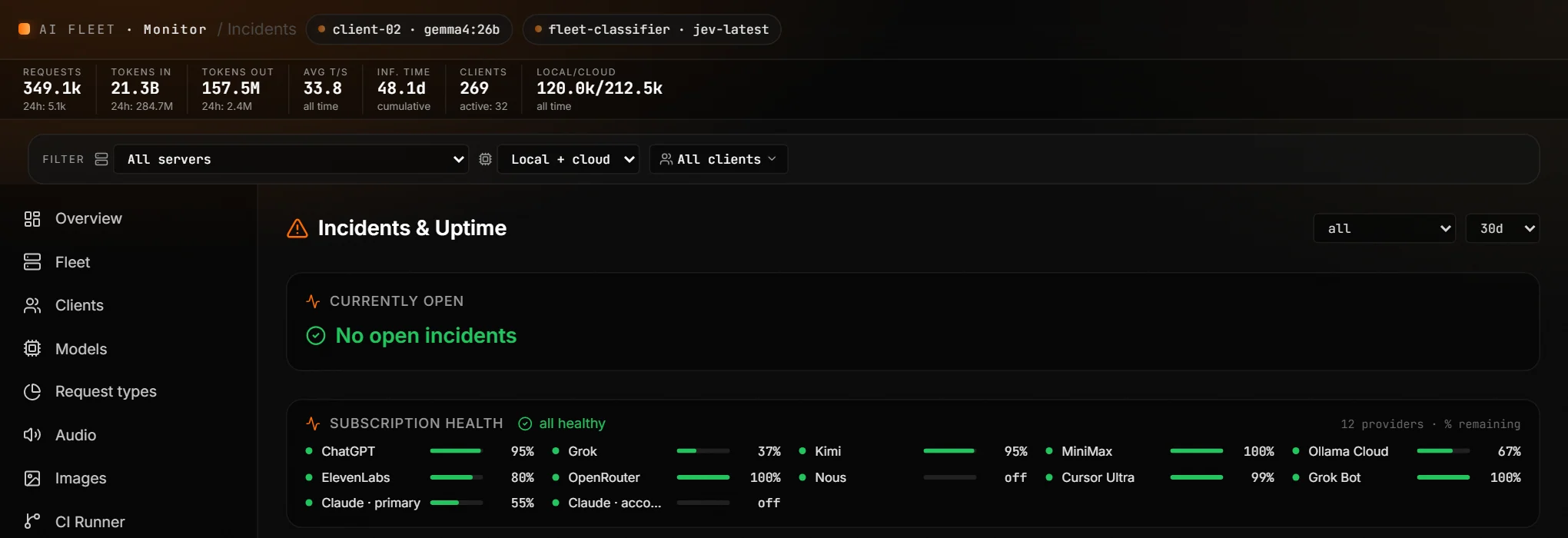
Live quota bars for every paid provider, with a page before anything runs dry.
- →12 metered subscriptions, from ChatGPT and Grok to Kimi, MiniMax, Claude and ElevenLabs
- →Weekly and 5-hour windows with reset countdowns
- →A page at 50, 25 and 10 percent remaining
- →Per-client consumption, with a rate limit per client
📡Live request feed
Every request, as it happens.
- →Model, node, client and tokens per second
- →Tokens in and out, cache hit rate and reasoning effort
- →The type of work on every card
- →Filters for text, images, audio and workers
🖥️Per-node fleet health
GPU, memory, temperature and power for every backend.
- →Loaded models, plus image and voice pools, per node
- →A power-derived GPU estimate on the Spark nodes
- →Drain and resume, with a confirmation step
- →Routing flow from 5 minutes to 30 days
📊Analytics and PDF reports
Throughput, tokens and latency by model and by client, exportable in a click.
- →24 hour, 7 day and 30 day windows
- →Prompt-cache rate per model
- →Time to first token by model and by client
- →One-click PDF reports for the team
💸Spend attribution
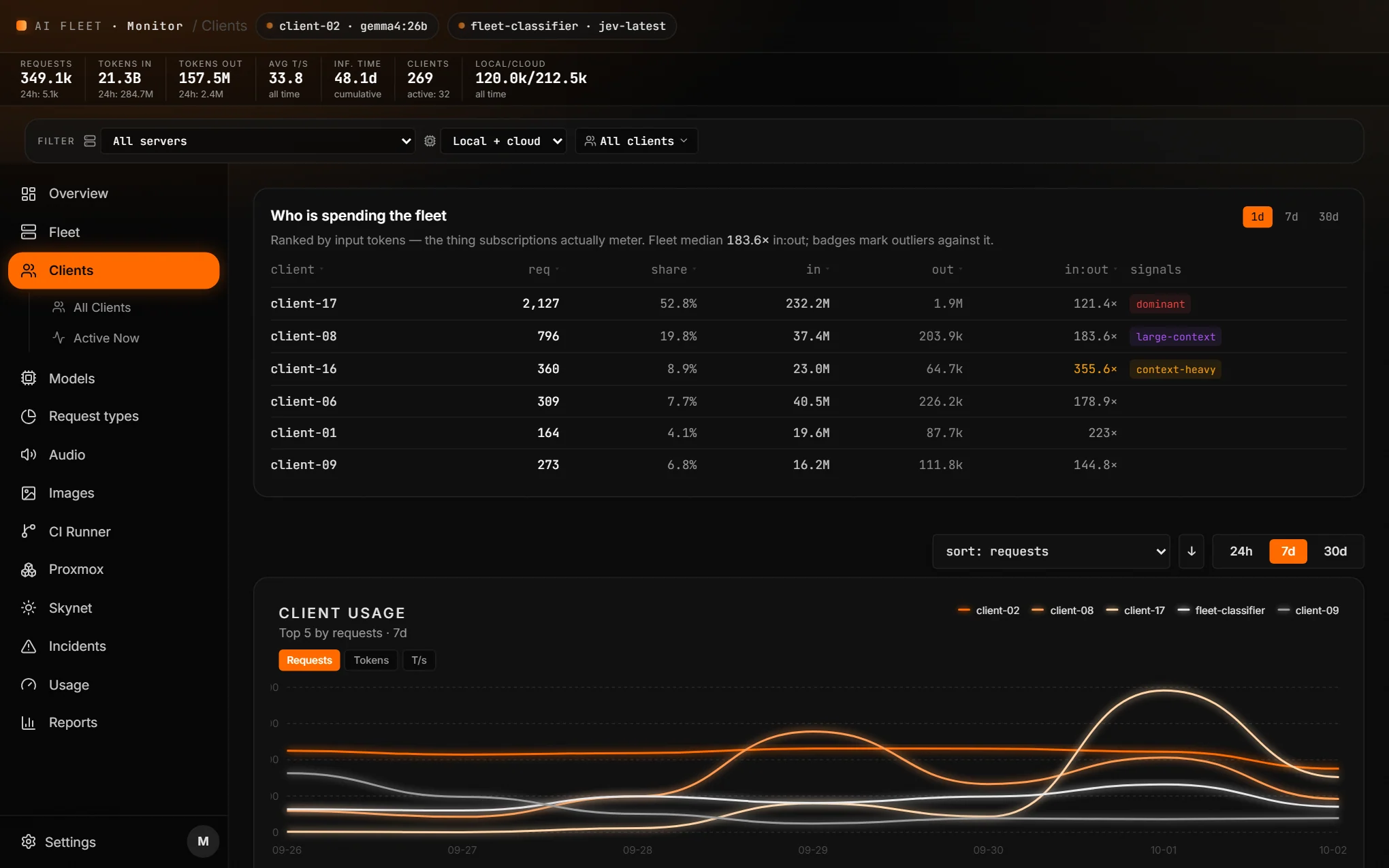
Who and what is spending the fleet, ranked by what subscriptions actually meter.
- →Every model ranked by input tokens
- →Every client ranked the same way
- →Outliers flagged: dominant, large-context, context-heavy
- →Cost per request and top users on the overview
🏷️Request types
Every session typed by the work it does, with the machinery split out.
- →41 categories in use, 98 percent of real work placed
- →Heartbeats, compaction and subagents counted as internal machinery
- →Click any category for the clients and models behind it
- →A weekly taxonomy health report
🔋Skynet, the off-grid micro-data center
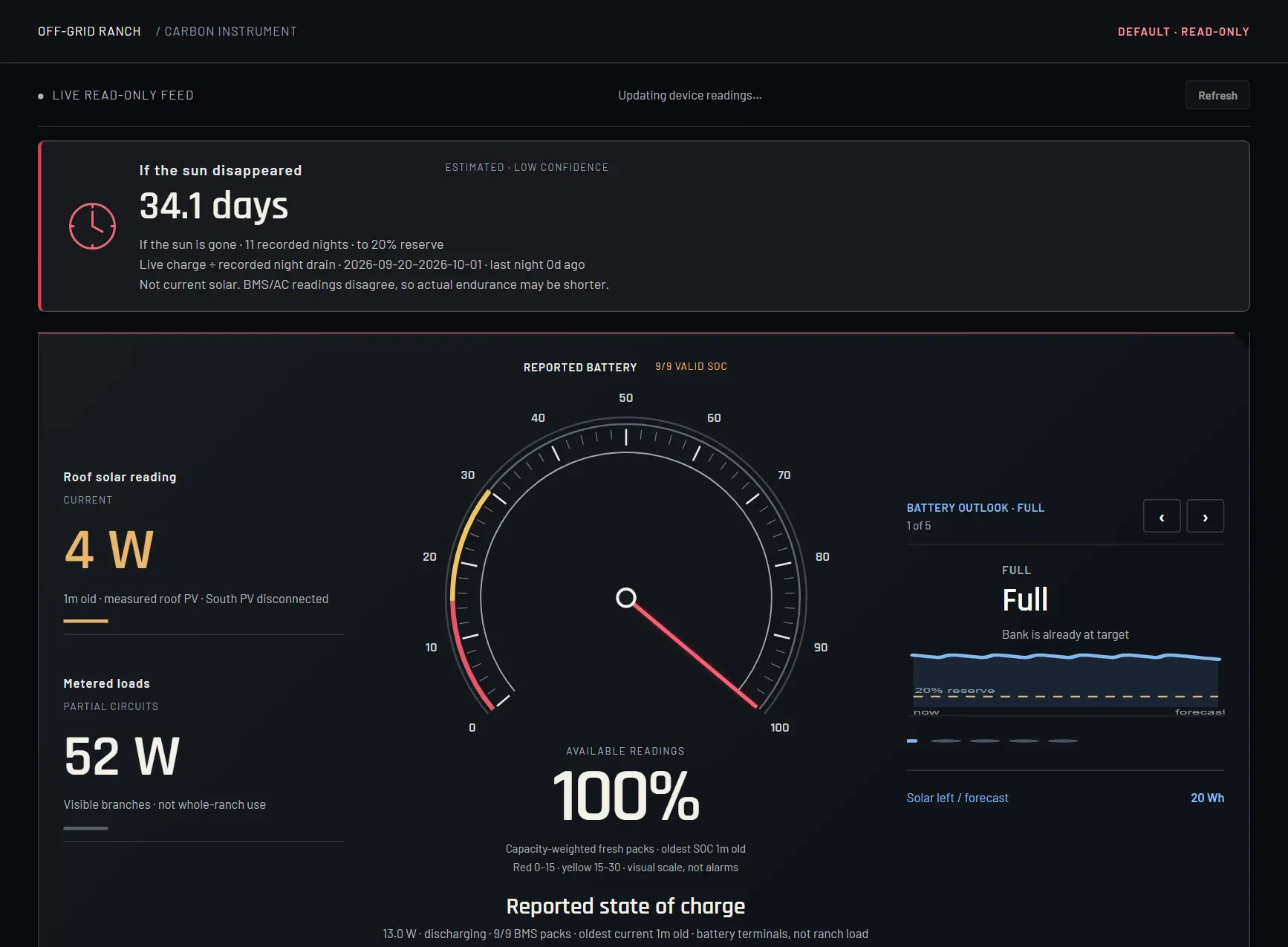
Solar, battery and load for the off-grid site that backs the fleet and our clients.
- →Battery, solar and metered load in one view
- →A fleet view for the compute: 5 nodes, 80 threads, 40 cores, live temps and memory
- →An estimate of how many days it runs if the sun disappeared
- →Read-only by design, so monitoring can never change anything
🧱Proxmox cluster
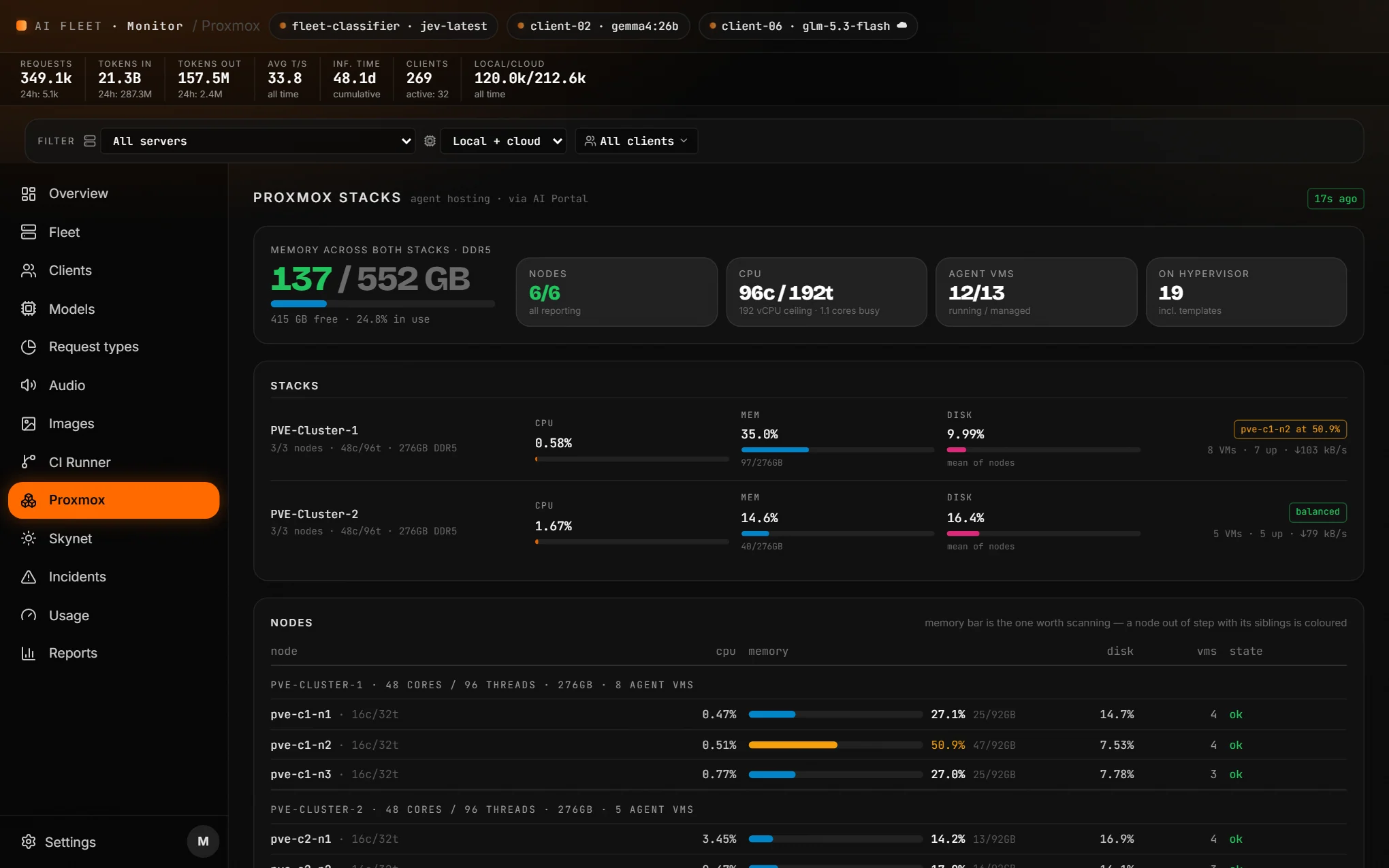
Agent hosting on two clusters, watched next to the GPUs.
- →6 nodes, 192 threads and 552 GB of DDR5
- →12 of 13 agent VMs running
- →A node out of step with its siblings gets colored
🛠️CI runner
Know the build box is healthy before a deploy needs it.
- →Runs passed, runner and service health on one bar
- →Memory, workspace and load for the runner
- →Per-repo last-run age, and a watchdog row
🔌Fleet MCP
The whole fleet as native agent tools. One server, every tool.
- →30 tools: image, video, voice, music, speech-to-text, knowledge, memory, tasks and shares
- →Portal mode with a per-client key, or router mode for our own agents
- →One line installs it, and it updates itself on every start
- →Works with Claude, Cursor, OpenClaw and any MCP-capable agent
- →Prefer a raw API? OpenAI- and Ollama-compatible endpoints too
🔑Client and agent portal
A hardened studio for people, with scoped keys for agents.
- →Magic-link sign-in for people, scoped keys for agents
- →Strict per-tenant isolation, with an admin view across clients
- →Search the library by prompt, voice, model and date
- →Characters and reference photos locked to their owner
- →30 to 60 day retention by media type, on self-hosted storage
📚Knowledge bases and agent memory
Files, PDFs and URLs any agent can search, plus per-agent memory.
- →Upload files and PDFs, or point at a URL behind an SSRF guard
- →PDF pages become citable sections
- →Search from the Knowledge tab or over MCP
- →Per-agent memory on free local embeddings (bge-m3)
- →Embeddings keep serving while a node drains
🔗Share links
Public links for library files, with an expiry you can only shorten.
- →Share library media and reference photos
- →A link expires with its file
- →Created from the studio or over MCP
- →Apps can probe a link before downloading
🧑💻Worker agents
An agent can spawn a coding agent and collect the result.
- →Spawn a coding agent on a Cursor cloud worker
- →Choose the repo, branch and model, and let it open the PR
- →Results and PR links land back in the library
- →Launches are attributed to the requester in the live feed
- →A model policy per owner keeps costs in check
⚖️Typed decisions
Ask with a fixed set of answers, get one back with a calibrated confidence.
- →fleet_decide over MCP, /api/decide over HTTP
- →Powered by TypeSafe AI
- →Agents stop parsing free text
- →The same engine types every session by the work it does
🩺Uptime and incidents
30-day uptime per node and per pool, with incidents caught live.
- →Uptime per node and per pool across text, image and voice
- →Live incident detection, with history
- →Subscription health for 12 providers in one strip
- →Sortable tables, so the weakest node is at the top
🩹Self-healing fleet
The failures that used to need a hard reboot now fix themselves.
- →A node that drops Wi-Fi reconnects itself
- →A watchdog that can't wedge the fleet
- →Agent sessions that spin with no progress get flagged
- →A hot-standby router, with deploys synced to it automatically
🛡️Voice guardrails
A tool call fails loud and clear instead of guessing.
- →A locked voice stays locked across a whole batch
- →An unknown voice is rejected, never silently swapped
- →Failures come back as structured errors an agent can act on
- →Ambiguity triggers a question, not a guess
Our GPUs first. The latest cloud models when it counts.
One router, more than one engine per job. We run our own models, and tap OpenAI, Grok and MiniMax as their newest models land.
Image
Text-to-image, image-to-image and subject reference. The router picks the engine by the job.
Video
Image-to-video from a still or a reference photo. Every render shows up in the live feed with who asked for it.
Voice
Clone a voice twice: on our own GPUs, and on MiniMax on top. The router sends each request to the engine the voice lives on.
Text and agents
Twelve metered subscriptions sit behind the same endpoint, each with a live quota bar and a fallback chain.
Built like the terminal we live in
Real screenshots from the live dashboard. Client names, IPs, prompts and task labels redacted. Dense, fast, and information-rich.
The whole fleet on one screen
Open the dashboard and we know exactly what the fleet is doing. Every request card shows tokens in and out, cache hit rate, reasoning effort and the type of work. Nodes, subscriptions and the machinery behind them sit right below.
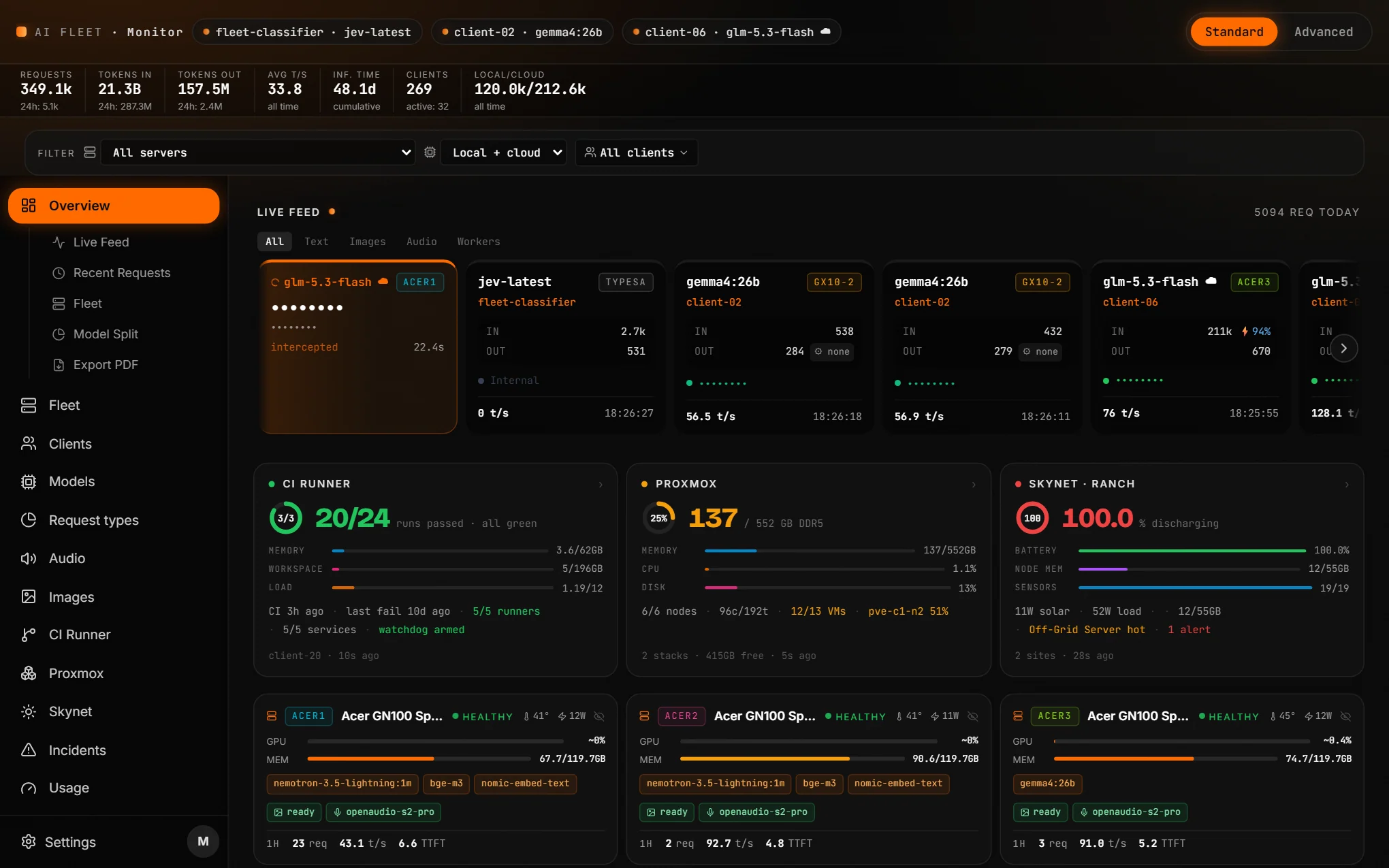
- →Live feed with tokens in and out, cache hit rate and reasoning effort
- →Every request typed by the work it does
- →Requests, tokens in and out, avg t/s and clients up top
- →CI runner, Proxmox and Skynet on the same screen
- →Every node and every subscription in one view
Every node, healthy or not, at a glance
The Fleet view shows all 13 backends, 6 GPU nodes plus 7 cloud accounts, with a live routing flow from the last 5 minutes to the last 30 days. Each node gets its own card with GPU, memory, CPU, disk, temperature, power and loaded models.
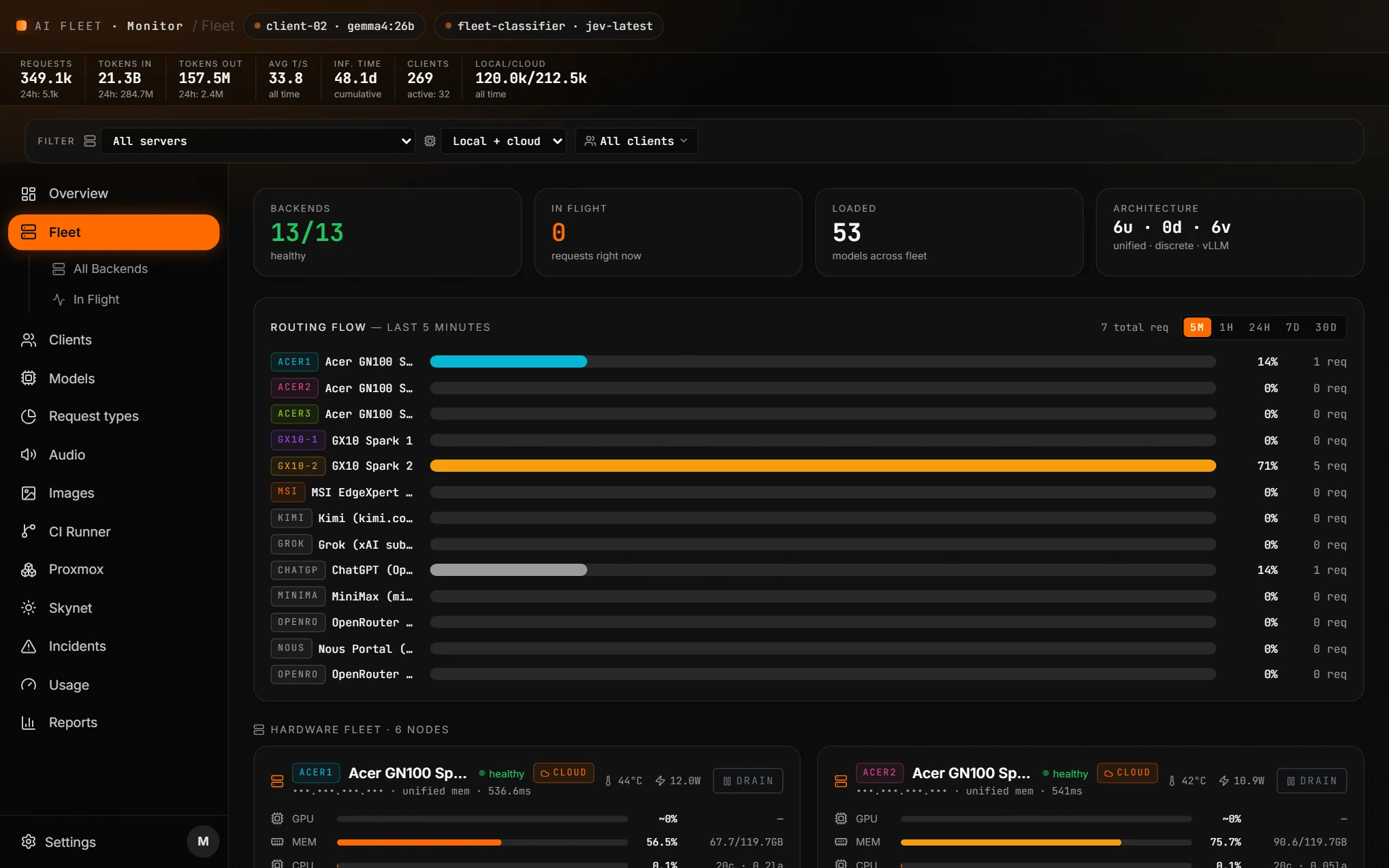
- →13 of 13 backends healthy, 53 models loaded across the fleet
- →Routing flow from 5 minutes to 30 days
- →Image and voice pools per node
- →Drain and resume, with a confirmation step before anything moves
Know what it costs, and who is spending it
The Models view leads with "what the spend is going to": every model ranked by input tokens, the thing subscriptions actually meter. The Clients view does the same for every client. Outliers get flagged automatically, so a runaway agent stands out.
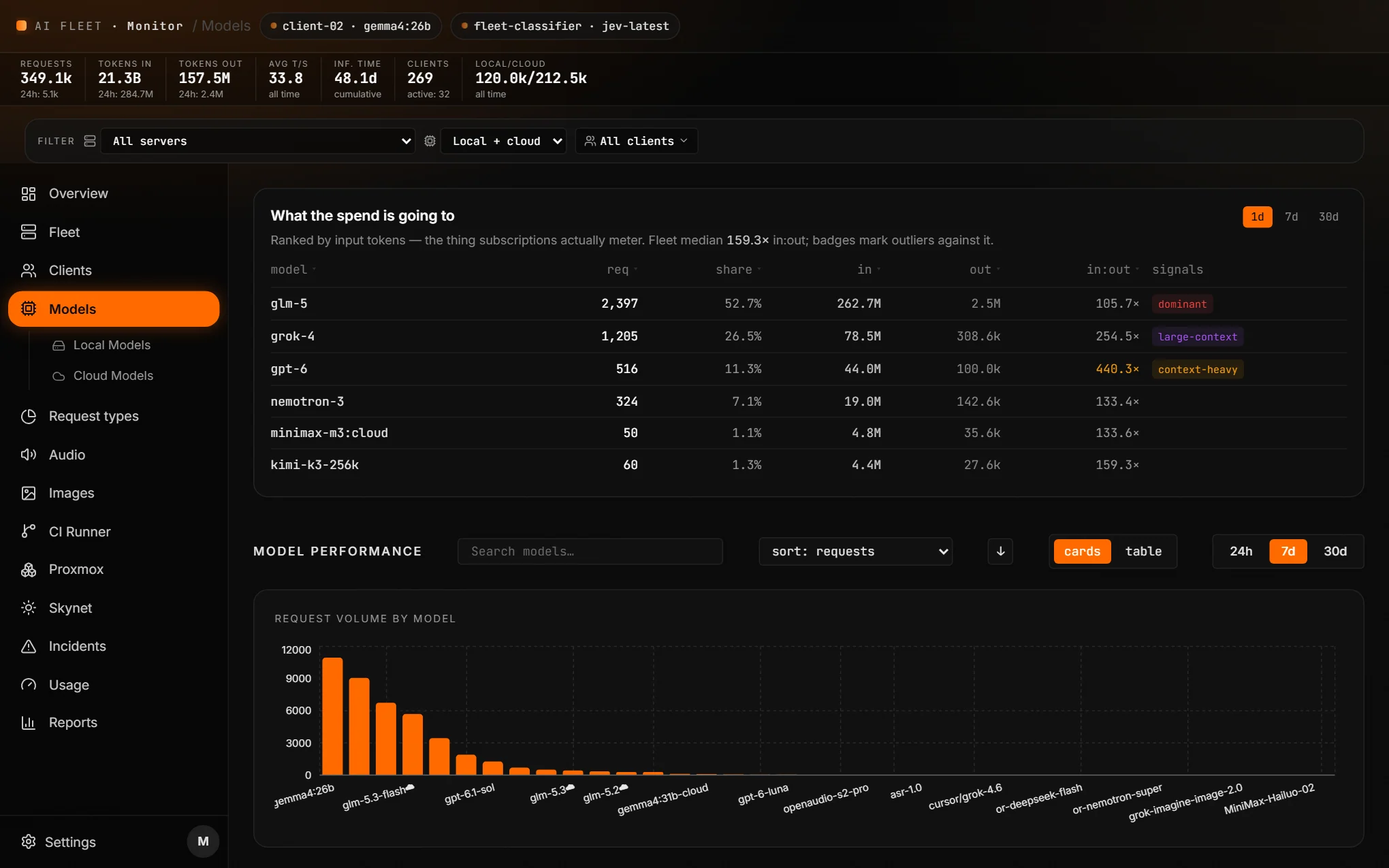
- →Spend by model and by client, ranked by input tokens
- →in:out outliers flagged: dominant, large-context, context-heavy
- →Throughput and latency per model, local and cloud side by side
- →1 day, 7 day and 30 day windows
Every request, typed by the work it does
Each session is classified by what the work is, separate from who triggered it. Heartbeats, compaction and subagents are split out as internal machinery, so they can't skew the numbers.
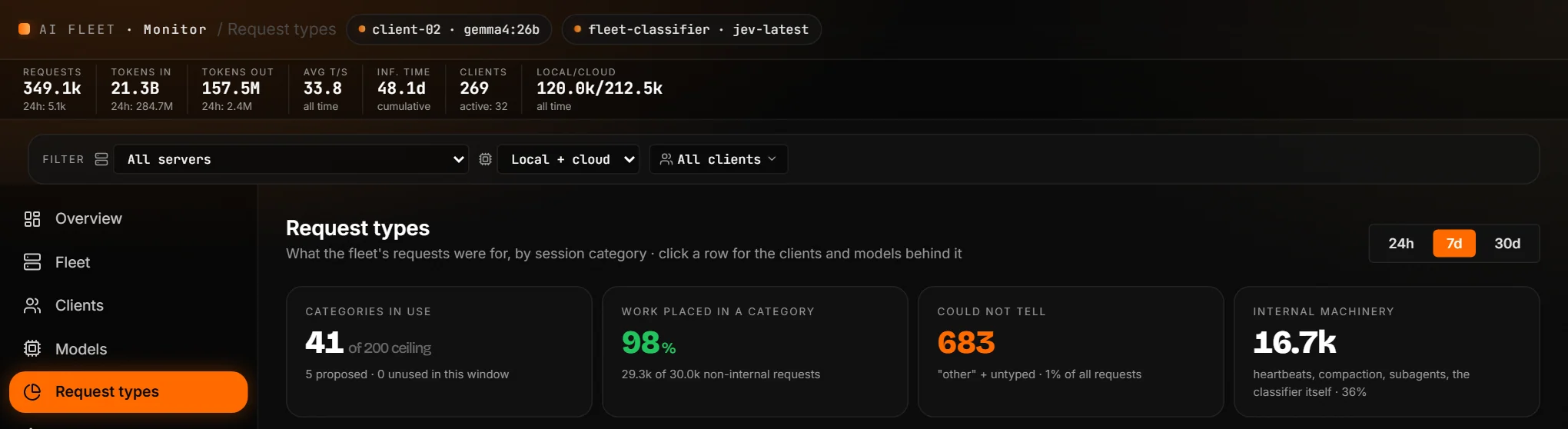
- →41 categories in use, 5 more proposed and awaiting approval
- →98% of non-internal work placed in a category
- →36% of all requests are internal machinery, tracked on their own
- →Click any category for the clients and models behind it
Local first. Cloud when it counts.
The router keeps work on our own silicon by default. It overflows to 12 metered subscriptions when the fleet is saturated, a request needs a model we don't host, or the job is cloud-native by design (frontier reasoning, premium voice). Each one has a live quota bar, a reset countdown and a fallback chain.
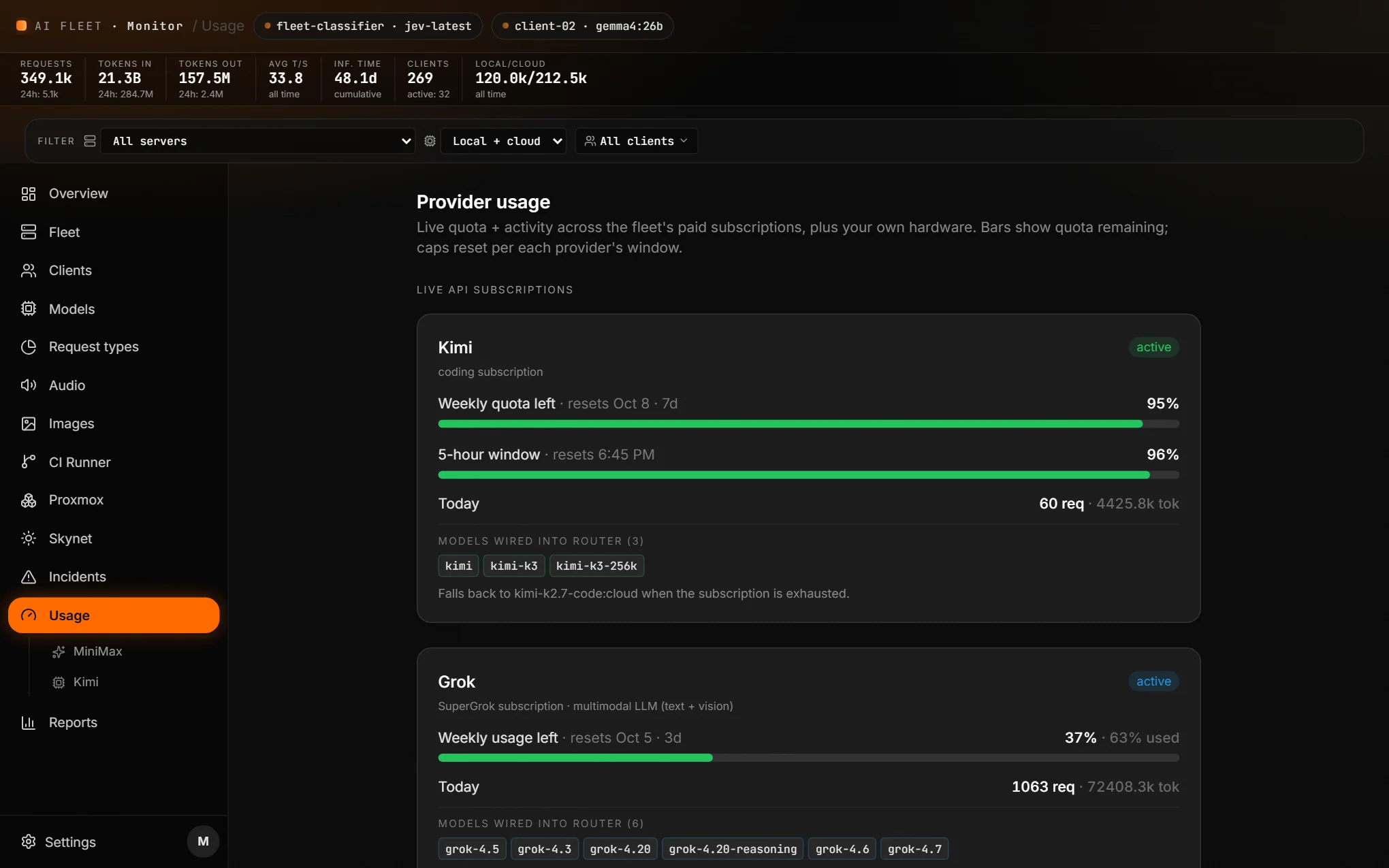
- →Live local-vs-cloud traffic split (36/64 all-time)
- →Weekly and 5-hour windows with reset times
- →Falls back automatically when a subscription is exhausted
- →A page at 50, 25 and 10 percent remaining
The metal behind it, even the power
Skynet is our off-grid micro-data center for the fleet and our clients, and the Sky Monitoring Network watches it. Battery, solar and metered load get their own read-only view, and so does the compute. Proxmox hosts the agents on two clusters. All of it reads from the same dashboard.
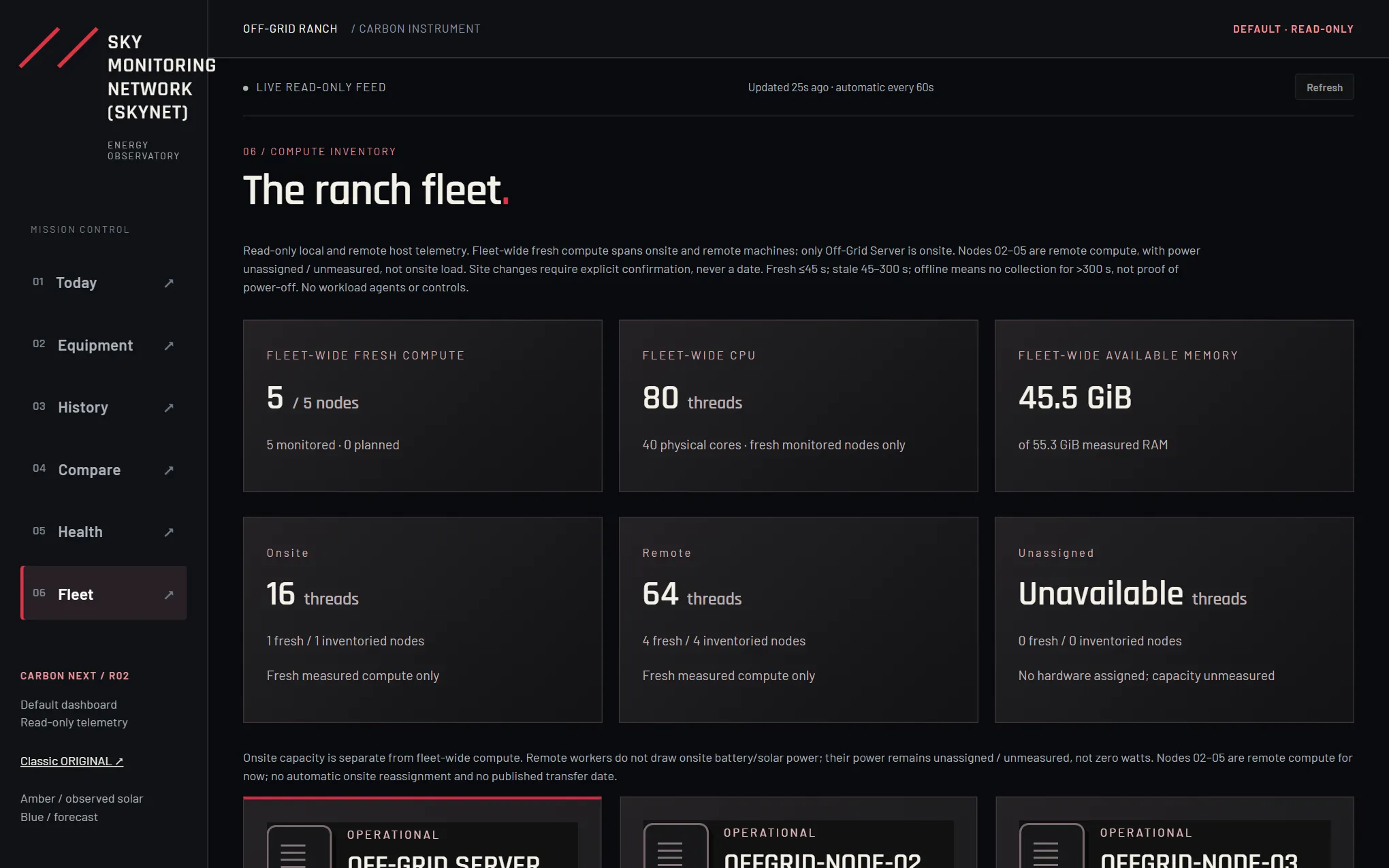
- →Skynet: battery, solar and metered load for the off-grid site
- →Its own fleet view: 5 compute nodes, 80 threads, 40 cores, live temps and memory
- →An estimate of the days it runs if the sun disappeared
- →Read-only by design, so monitoring can never change the site
- →Proxmox: 6 nodes, 192 threads and 552 GB of DDR5 across two clusters
- →12 of 13 agent VMs running, with the CI runner beside them
What our users actually see
app.aifleetrouter.com. Sign in with a magic link. Make images, voice and knowledge bases, with no software to install.
Type an idea. Get an image.
The Images tab turns plain words into pictures on our GPUs, or on the best cloud model for the job. One tap optimizes the prompt, "Put yourself in it" brings in a saved character, and every result keeps its model, seed and prompt.
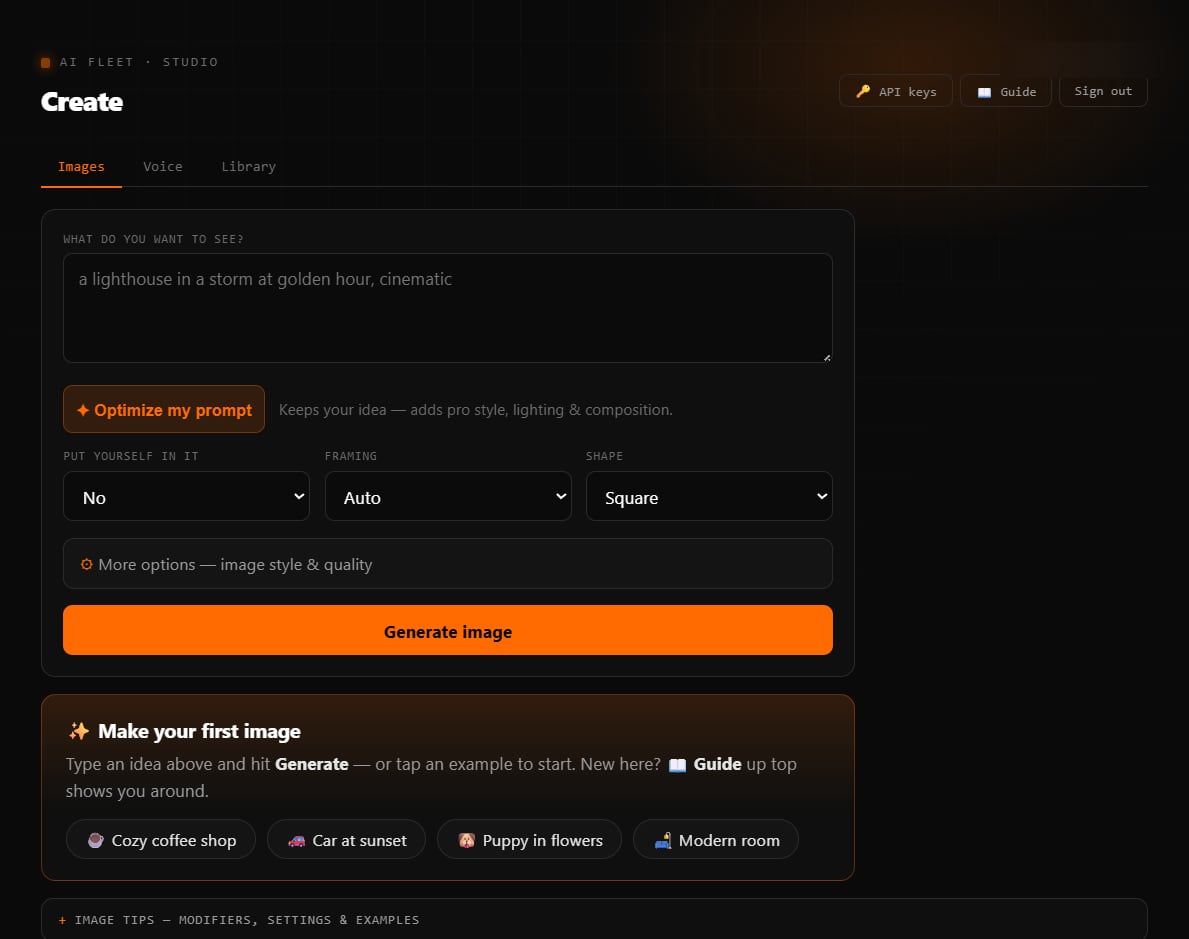
- →Optimize my prompt, one tap
- →Put yourself in it, with a saved character
- →Framing and shape presets
- →Tips, modifiers and examples built in
Type it. Hear it.
The Voice tab speaks a script in any saved voice. Inline tags like [excited] shape the delivery, and Polish the script cleans the wording and sets the pacing. The clip lands in the library, ready to download.
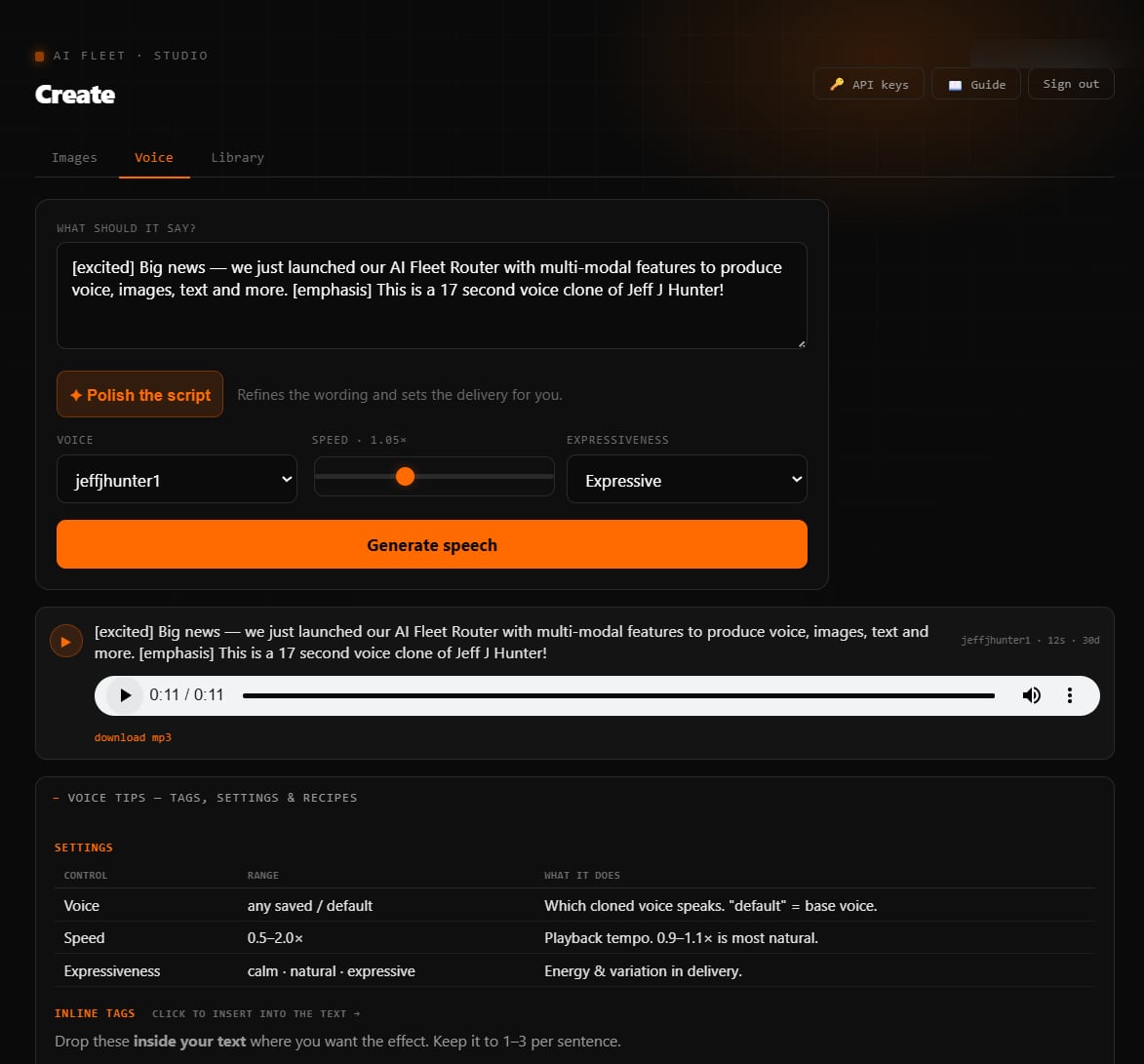
- →Pick a cloned voice, speed and expressiveness
- →Inline tags like [excited] and [emphasis]
- →Polish the script, one tap
- →Download as MP3
A studio for our team, clients, and agents
app.aifleetrouter.com is a hardened, multi-tenant studio built around Images, Voice, a Knowledge base and a shared Library, plus a per-owner character library so a client's likeness stays locked to their own account. People and clients sign in with a magic link. Agents authenticate with a scoped key or MCP.
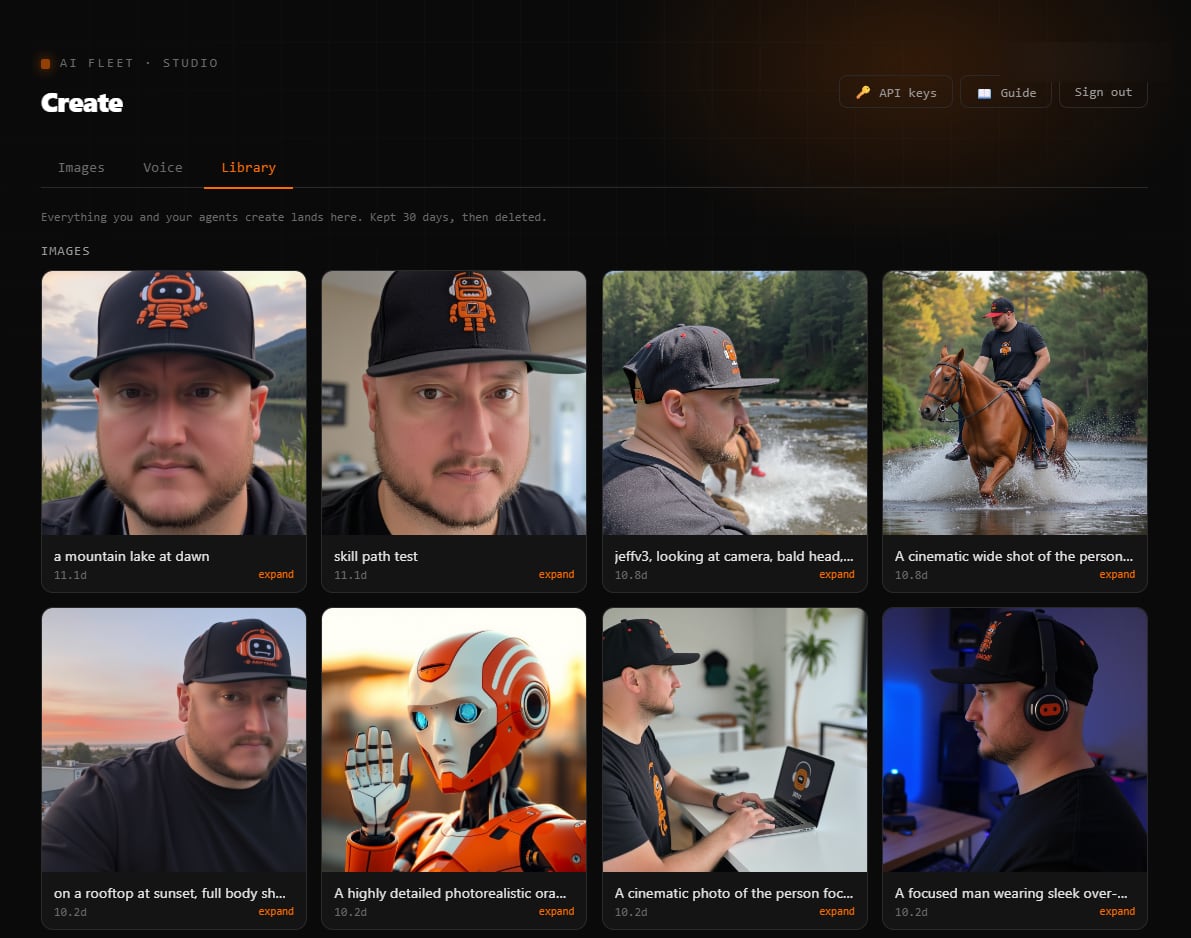
- →Magic-link sign-in, strict per-tenant isolation
- →Named reference photos and trained characters, locked to their owner
- →Search the whole library by prompt, voice, model and date
- →Share any file with an expiring public link
- →Private library on self-hosted storage, 30 to 60 day retention by media type
Photorealistic, and perfectly on-brand
Images render on our own GPUs with FLUX. Schnell for speed, dev for quality. A saved character keeps a consistent likeness across every generation. Cloud engines like Grok, ChatGPT and MiniMax are there when a job needs them.
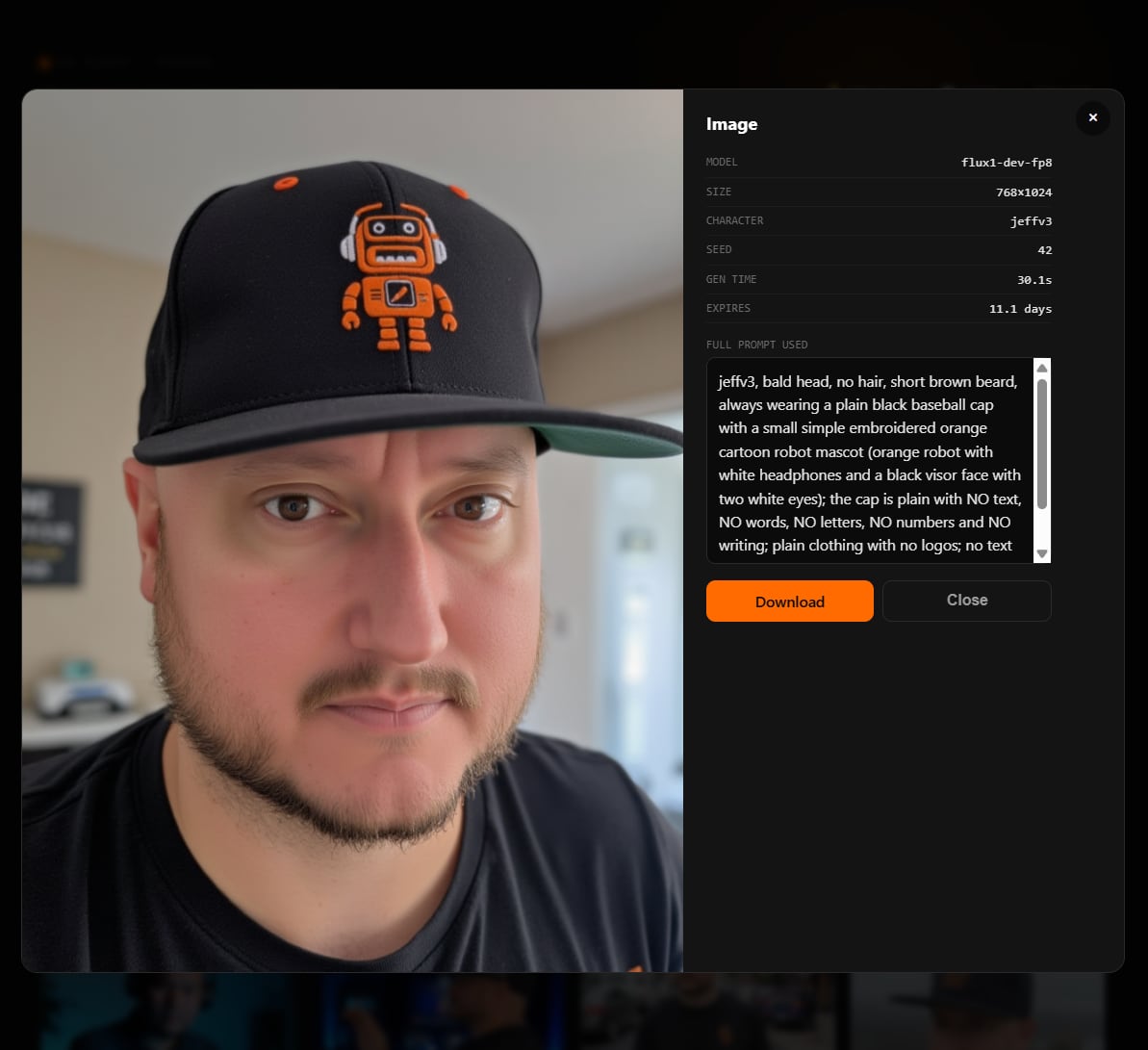
- →FLUX schnell + dev, on local silicon
- →Reusable characters for a consistent likeness
- →“Put yourself in it” + one-tap prompt optimizer
- →Model, seed & full prompt saved with every image
Connect an agent in two steps
Give an AI agent a key and it makes images and voice on a person's behalf. Everything it creates lands in that person's library. Prefer MCP? One block of config connects the whole fleet, with the key already filled in.
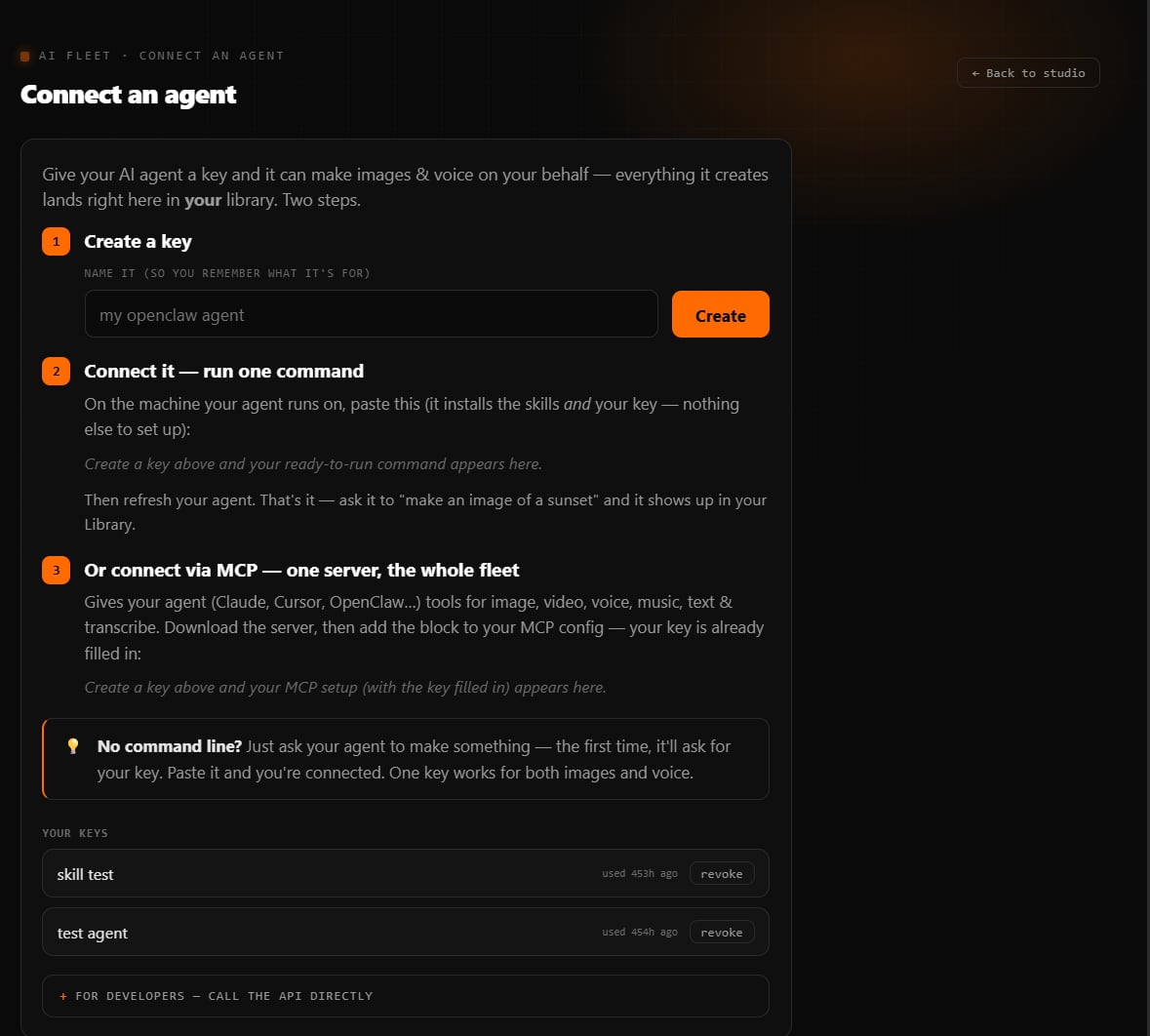
- →Create a key, then run one command
- →Or connect over MCP, with the key filled in
- →Works with Claude, Cursor and OpenClaw
- →Revoke any key in one click
One MCP server. Every tool on the fleet.
Point any MCP-capable agent, Claude, Cursor, OpenClaw, at fleet-mcp and it gets image, video, voice, music, transcription, knowledge bases, memory and coding agents as native tools. It is one zero-dependency Python file. It installs in one line and updates itself on every start.
- →30 tools: image, video, voice, music, stt, knowledge, memory, tasks, shares
- →Portal mode with a per-client key, or router mode for our own agents
- →Self-bootstrapping. It downloads itself on first launch
- →Self-updating, so new tools reach every agent on its next start
- →Structured errors and guardrails, so a tool call fails loud instead of guessing
"[excited] Big news, we just launched our AI Fleet Router with multi-modal features to produce voice, images, text and more. [emphasis] This is a 17 second voice clone of Jeff J Hunter!"
Not a demo. It runs our agents
AI Fleet Router serves the real agents and products we operate every day. Point any agent framework at one endpoint and it's on the fleet.

Humans are great. AI is great. Humans + AI is unfair. The fleet is the AI half.jeffjhunter.com ↗Agency on Autopilot ↗
Why a marketer built a GPU router
AI Fleet Router didn't come from a lab. It came from needing to run a small army of AI agents, reliably, privately, and without a runaway cloud bill.
From AI Persona Method™ to a fleet of GPUs
Jeff has spent 11+ years scaling businesses with humans + automation. Featured in Entrepreneur Magazine and Business Insider, creator of the AI Persona Method™, and the founder behind 1,000+ students building businesses that run without them.
As his team deployed 15+ AI Employees across messaging channels, the question stopped being "can AI do the work" and became "where does all this inference actually run?" Renting cloud tokens for every agent doesn't scale. So Jeff stood up a fleet of local GPU boxes to serve models privately. But a pile of Sparks with no visibility is just expensive guesswork. AI Fleet Router was the missing control plane, the dashboard that finally made the fleet observable, balanced, and accountable.
Build your own AI-powered income
AI Fleet Router is the kind of infrastructure that runs a business on AI. Learn the playbook behind it, 8 proven ways to make money with AI, live group calls, and 100+ guides, inside AI Money Group.